According to TOI (Times of India) Cyber security has alerted about the infectious Trojan virus which attacks Android-based smart phone users. This virus is named as “AndroidSmssend” and it can acquire as many as four aliases to hoodwink the user and perpetrate its destructive activities on a personal Android enabled phone.
Android/SmsSend is a premium service abuser family malware that arrives bundled with legitimate Android applications and infects Android based smart phones.
“Once infected, it sends text messages (typically with a link to itself or a different threat) to a specific number, typically to numbers on the contact list and is also capable to send SMS to premium rate numbers,” the Computer Emergency Response Team of India (CERT-In) said in its latest advisory to Android phone users in the country.
The virus is so notorious, the agency said, that it “steals contacts and pictures, tracks the location, steals passwords, illegally accesses text messages, crashes a complete system, steals personal banking information when logged in, installs other sort of spy ware and disables firewall and anti-virus program to defend itself.”
The agency has suggested some counter-measures in this regard.
“Do not download and install applications from untrusted sources, install applications downloaded from reputed application market only, run a full system scan on device with mobile security solution or mobile anti-virus solution, check for the permissions required by an application before installing, exercise caution while visiting trusted/untrusted sites for clicking links, install Android updates and patches and use device encryption or encrypting external SD card feature available with most of the android OS (operating system),” it said.
And also, avoid using unsecured, unknown Wi-Fi networks and make a practice of taking regular backup of the Android device, the advisory said.

You Can’t Block Mark Zuckerberg on Facebook

It so happens that if you wish to block Mark Zuckerberg from your Facebook account, you cant.
You may have felt angry at Facebook for various reasons like your fan page reach has diminished or your pages get unpublished and you may want to block the account of the creator of Facebook, Mark from your account, you’ll get an error saying

If you try to block him again after a few minutes, you will get the same message.
It seems that Mark Zuckerberg, the creator of Facebook and a man with around 31 million Facebook followers is also one of the most hated men on Facebook. The above error message pop ups because of Facebook algorithm which kick in when too many people try to block one user.
Facebook says, this is designed so as to protect the voice of the people who raise a campaign for a good cause, and people who are not happy with the campaign try to block the user. This is a general error which is same for everyone and is generated due to too many users trying to block one user.
This was first noticed by a website Block Zuck which seems to have been created with sole purpose of testing this service.  After Block Zuck reported this peculiar Facebook feature, Gizmodo spoke with the website’s founder and learned that the site was originally the base of operations for a viral campaign to mass-block Zuckerberg in protest of the social network’s controversial user privacy policies.
This error isn’t specific to any one account. It’s generated when a person has been blocked a certain large number of times. In very rare instances, a viral campaign will develop instructing lots of people to all wrongly block the same person. The purpose of this system is to protect the experience for people targeted by these campaigns. We’re constantly working to improve our systems and are taking a closer look at this one."
This is actually a good feature in a situation in ererwhich an undeserving innocent could be the victim of unfair mass blockings.


Microsoft already shown the first look of  Windows 10 operating system on Tuesday at San Francisco. Microsoft promised an OS that will be more intuitive for the millions of workers still on Windows 7 and older OSes. It will span all hardware from PCs to phones and try to address the ills that have dogged Windows 8.
Here are 10 things you need to know about Windows 10:

1. Why Windows 10?

The natural name would have been Windows 9, but Microsoft is eager to suggest a break with the past. “We’re not building an incremental product,” said Terry Myerson, head of Microsoft’s Operating Systems Group.
Microsoft considered the name “Windows One,” he said, to match products like OneNote and OneDrive and its “One Microsoft” business strategy. But he noted the name was snagged a long time ago, by a young Bill Gates.
Perhaps Microsoft didn’t like the idea of being numerically one step behind Apple’s OS X. Whatever the reason, Windows 10 it will be.
“When you see the product in its fullness, I think you’ll agree it’s an appropriate name for the breadth of the product family that’s coming,” Myerson said.

2. What devices will it run on?

All of them. Microsoft demonstrated only the desktop version Tuesday, but Windows 10 will be for tablets, smartphones and embedded products, too.

3. Is there a start menu?

There is, and it tries to combine the familiarity of Windows 7 with the modern interface of Windows 8. That means the menu is split: On the left, apps are displayed in the familiar Windows 7 style, while on the right are more colorful “live tiles” that open the modern, Windows 8-style apps.
The start menu is customizable, so you can resize the tiles and move them around, and make the start menu tall and thin or long and flat.

4. Is there a Command Prompt?

You’re kidding, right? Well, actually there is. Microsoft showed how it now supports shortcuts like CTRL+C and CTRL+V so you can paste in a directory listing from another app, for instance. Belfiore called it a “niche, geeky feature” but said he wanted to show the diverse range of users the OS is trying to support.

5. What car does it resemble?

Microsoft came up with a car analogy. It wants you to think of Windows 10 as a Tesla.
“Yesterday, they were driving a first-gen Prius, and when they got Windows 10 they didn’t have to learn to drive something new, but it was as if we got them a Tesla,” Myerson said.
“It will run on the broadest types of devices ever, from the smallest ‘Internet of things’ device to enterprise data centers worldwide,” Myerson said. “Some of these devices have 4-inch screens, and some will have 80-inch screens. And some don’t have any screen at all.”

6. Will I still toggle between two distinct app environments?

Apparently not. In Windows 8, when you launch a modern-style app, it takes you into that modern UI, and when you launch a Win32-style app, it launches to the traditional desktop environment.
In Windows 10, “we don’t want that duality,” said Joe Belfiore, a corporate vice president with the OS group. “We want users on PCs with mice and keyboards to have their familiar desktop UI—a task bar and a start menu. And regardless of how an app was written or distributed to your machine, it works the way you expect.”

7. So how does it look now?

If you launched one of the new-style apps in Windows 8, it filled the whole screen and there weren’t many options to resize it. With Windows 10, the familiar “windows” metaphor is back; you’ll be able to resize the new-style apps and drag them around the screen like an old Win32 app. Conversely, if you’re using an older Win32-style app, it will be able to “snap into place” and fill all the available screen space just like the modern apps.

8. What else is new?

Some users have been confused by the Windows 8 interface and can’t figure out what’s open on their screen or how to get back to an app. Windows 10 has a feature like OS X’s Mission Control that lets you zoom out and see everything that’s open on a PC, then select any app to enter it.
You can also have multiple desktop configurations open and switch between them. So if you have two apps on the screen for a particular task, sized just how you want them, and then you change to some other apps, you’ll be able to get back to those first apps easily without having to resize them again. You can navigate through several of these desktop displays at the bottom of the screen.

9. Will it still be touch-enabled?

Yes. “We’re not giving up on touch,” Belfiore said. That means you’ll still be able to use touch to do things like scroll and pinch-to-zoom on laptops and desktops.
There’s also a new feature, tentatively called “continuum,” for people using two-in-one PCs. When you detach the keyboard from a Windows 10 hybrid, it will ask if you want to go into tablet mode. If you say yes, the UI changes to better match a tablet. The app expands to full screen, for instance, and the start menu switches into a larger-icon mode.

10. When will it be released and How will it be priced?

The OS will launch around the middle of next year, after Microsoft’s Build conference. Before that, a select group of “Windows insiders” will receive a “technical preview build” for laptops and desktops on Wednesday this week, followed “soon after” by a preview for servers. Previews of other device categories will follow later.

We all know in the last couple of days there have been some major websites that have been hacked including Sony, ICANN, Ars Technica and to name few. There is nothing you to do a specific website getting hacked it happens it happens but definite thing is you can do to make sure that your data safeguarded and secured.

Don’t use the same password on multiple sites

The first thing is very simple don’t use the same password on multiple sites, big mistake we all do. It’s a very bad thing for security guard. Let’s say you have an account on twitter, you use it daily and the same password is on the multiple sites, if you have a Gmail account with this password they just rush and give a try the same password of twitter. They have access to your email and once they have access to your email you know the rest. To avoid this just don’t ever use the same passwords on multiple sites. It’s simple to remember different passwords for different websites if you have an awesome brain, if not it is very much simple we recommend using LastPass. Last Pass software allows you to create a long random password.


For Example:

Let’s take "douknow" it’s a simple nice password to remember and hack easily. Now, let’s make this one more good and secured d0UkN0w. Don’t use Dictionary words if someone is trying to hack you it is easy to crack. Last Pass will allow you to create password with mixture of Uppercase, Lowercase and Punctuation. It’s hard to remember or memorize multiple passwords like this for multiple different sites. You don’t need to be worry since Last Pass will save your password. Last Pass is also integrated to most of the major websites; just download the extension and it auto fills the password for particular site.

Change your passwords frequently


We really don’t need to be worry the sites which we don’t use much which we don’t have personal information, but coming to the sites we use daily like banking, email and social accounts etc., It’s a good idea to change your password once in a month, have a lot of our personal information which costs a lot if we get attacked.

Try to use Anti Virus

If you are running a Mac or Linux you really don’t need to be worry coming to Windows (XP, Vista, 7 or 8) Anti Virus is just a good safety to your PC. Use Microsoft Essential which is free, pretty much light and doesn't use resources. Anti Virus not necessary; lot of people who do not use Antivirus ever had any issues. They are paid antivirus software you can buy anyone of them to be secured. We don’t recommend buying because they cost, they use a lot of resources on your processor and can slow your computer.

Keep your OS, Browser and Plugins up-to-date  

There are lots of things you getting attacked on Internet, that you could be using Windows or Mac. There are lots of updates coming to help with security bugs and all that kind of stuff. Keep your browsers up-to-date, using Chrome really you really don’t have to worry about updates as it automatically keep you up to date. If you are using Internet Explorer and Firefox it’s good to check for updates and update it. Don’t forget to update your plugins like flash, Silver light etc..,

Last but not least prudenceyou really need to be careful while downloading some crap and shady software which are all kinds of spyware and ad-ware which is not a virus technically and sometimes virus technically depending on the software and on your click. It makes shabby just check and read properly before installing any software rather than blindly clicking on Next Next Next and Finish.
Happy Safe and Secured Browsing!!


Electricity is considered one of the greatest inventions of mankind’s history. Currently, most of our gadgets depend on it, may it be smart phones, computers, anything. It would be quite apt to state that none of these would have ever come into existence without electricity. It is one of the basic needs. Biolite understands this and has taken a step to provide this facility to you more conveniently. Biolite is growing its line of off-lattice devices with its latest product, the Nanogrid, a joined lighting and force stockpiling framework that helps keep your camp lit and charges your USB-charging gadgets as well.


It provides you a nice backup support when you go for a little trip with your kids and keeps you updated by providing you the power supply you need but couldn’t find till now. Now you can enjoy your camping trips without keeping a factor of worrying about your devices, draining out of charge. It will also help in providing you power to light up your campsite with fairy lights and make it more exciting for you to gaze the starry skies. And you will also have proper lighting for your camp cooked dinner.

The Nanogrid framework embodies two units, the Powerlight, and the Sitelight. The Powerlight is the additionally intriguing of the two, and tips the scales at 210 g (0.5 pounds). It measures roughly 5.6 x 13.3 x 3 cm (2.22 x 5.27 x 1.15 in), and works as a light, lamp, and a force pack. In Torch Mode, it yields 250 lumens of concentrated light for up to as long as 8 hours, while Lantern Mode tosses out 200 lumens of 360 degree warm light for up to about 7 hours at a stretch. Nanogrid has crossed all the records of efficiency ever obtained and is hoping to be the best product of its own kind.

The Powerlight’s coordinated 4,400 mah Li-particle battery is charged through USB, making it good with the association’s own Kettlecharge, for instance. Once charged, it can then capacity as both a light and a force pack, charging any USB-fueled gadget, for example, a cell phone.
Up to four Sitelights can be daisy-affixed for a conceivable 40 ft (12 m) reach. Every Sightlight yields 150 lumens and will run for up to 4 hours at full splendor when connected to the Powerlight. The Sitelights measure 0.12 lb (55 g) and measure 6.4 x 2.7 x 6.5 cm (2.55 x 1.06 x 2.55 in) every light. The Nanogrid is propelling in February 2015 and will set you back US $79.99 for one Power light and two Sidelights.

Cyber bullying is bullying that takes place using electronic technology. Electronic technology includes devices and equipment such as cell phones, computers, and tablets as well as communication tools including social media sites, text messages, chat, and websites.
Examples of cyber bullying include mean text messages or emails, rumors sent by email or posted on social networking sites, and embarrassing pictures, videos, websites, or fake profiles.
Here are some facts about Cyber Bullying: 

1. Nearly 43% of kids have been bullied online.1 in 4 has had it happen more than once

2. 70% of students report seeing frequent bullying online. Filling up your friends Facebook feeds with positive posts instead of negative ones can boost school-wide morale. Start a Facebook page for students to submit positive acts they see in school to promote a culture of positiveness on.

3. Over 80% of teens use a cell phone regularly, making it the most common medium for cyber bullying
.
4. 68% of teens agree that cyber bullying is a serious problem.

5. 81% of young people think bullying online is easier to get away with than bullying in person.

6.90% of teens who have seen social-media bullying say they have ignored it. 84% have seen others       tell cyber bullies to stop.

7. Only 1 in 10 victims will inform a parent or trusted adult of their abuse.

8, Girls are about twice as likely as boys to be victims and perpetrators of cyber bullying.

9. About 58% of kids admit someone has said mean or hurtful things to them online. More than 4 out     10 say it has happened more than once.

10. Bullying victims are 2 to 9 times more likely to consider committing suicide.

11. About 75% of students admit they have visited a website bashing another student.


Stop Cyber Bullying

What do the latest technologies to flop, fizzle, and flame out tell us about innovation?


All successful technologies are alike, but every failed technology flops in its own way.

Success means a technology solves a problem, whether it’s installed on a billion smartphones or used by a few scientists carrying out specialized work. But many maybe most technologies do not succeed, typically because they fail to reach the scale of adoption that would make them relevant. The reasons for failure aren't predictable. This year we saw promising technologies felled by Supreme Court decisions, TV cameras, public opinion, and even by fibbing graduate students.
Below is our list of the most interesting technology failures of 2014. Below is our list of the most interesting technology failures of 2014. 

Google Glass


In 2012, Google introduced the world to Glass, computerized glasses that can show maps, display e-mails, and snap pictures and videos of whatever a person is looking at. But by the end of this year, expectations that the $1,500 wearable computer would be a consumer hit had been shattered. Half of app developerspolled by Reuters have stopped working on apps for Glass, and the consumer launchwas postponed until next year. Even the product’s visionary, Google cofounder Sergey Brin, began turning up in public not wearing the device as usual. One user told MIT Technology Review the problem was an experience that was far less helpful than expected: “I found that it was not very useful for very much, and it tended to disturb people around me that I have this thing.” Glass may yet find success in niche applications.


Brazil’s EEG Exoskeleton


Have a paralyzed person get up from a wheelchair, walk onto a soccer field, and kick the opening shot of the 2014 World Cup. This ambitious plan was the brainchild of mind-machine-interface expert Miguel Nicolelis, a professor at Duke University. After winning about $15 million from Brazil’s government, his team raced to build—and deploy—a robotic exoskeleton propelled by its wearer’s own thoughts.

The plan was too audacious. It called for collecting brain signals with an EEG cap. But the signals produced that way just aren’t good enough to control an exoskeleton. When the World Cup cameras cut in to show the demo during the opening ceremony, it was for three brief seconds—only enough to see a soccer ball rolling down a ramp and a paralyzed man steadied by two assistants raising his fists in triumph. Nicolelis declared that “17 months of insane work” had succeeded. But to TV viewers interested in the technology, or those seeing it for the first time, it was hard to know what had really happened. Rather than a man rising from a wheelchair and walking, the exoskeleton seemed to have achieved a simpler task of moving one foot forward to hit the ball.


Bitcoin


This was supposed to be Bitcoin’s big year. Instead, the electronic currency looks as if it may be stalling. The value of a bitcoin has dropped by 62 percent (to about $310) since January 2014, but potentially more troubling for the currency, it’s being used to move only about as much cash as it was a year ago,about $60 million a day. The idea of Bitcoin remains intriguing—a peer-to-peer currency with no central controller, instantly transmitted anywhere, and powered by a clever cryptographic engine. But in practice, it is more like a Ponzi scheme that attracts speculators, and it’s become the payment form of choice among professional cybercriminals. Bitcoin also suffers from a headache linked to its first killer app—as an easy way to buy drugs online. Authorities this year have continued to make arrests, and in November, the U.S. Marshals Service auctioned off 50,000 bitcoins, worth about $19 million, seized from drug dealers.
Bitcoin has passionate advocates. But a currency that few people use can’t be called a success.


STAP Cells


Last January, a team in Japan and at Harvard University published two high-profile papers in the journal Nature claiming they could turn any cell into a stem cell just by bathing it in acid (thus the moniker STAP, for stimulus-triggered acquisition of pluripotency) . The quick and easy recipe sounded too good to be true—and it was. When other labs failed to repeat the process, it became clear the results had been fabricated by an ambitious young researcher. In August, her boss, Yoshiki Sasai, a renowned 52-year-old stem-cell scientist at Japan’s Riken, committed suicide after saying he had been shamed. It’s not the first time a stem-cell discovery has turned out to be bogus. But Jeanne Loring, a cell biologist at the Scripps Research Institute, says there’s no more fraud in stem cells than in other fields. Instead, says Loring, the collapse of this promising technology is due to the growing pressure to publish big results, something that affects all of biology.


Sapphire iPhone Screens


The iPhone 6 that Apple unveiled in September was bigger, slicker, and more powerful than earlier models. But the phone didn’t come with screens made of sapphire—a super-hard transparent crystal that Apple once hoped might give its $700 phones a boost with consumers.

Apple’s $1 billion plan to introduce harder screens went wrong when it built a new sapphire factory before the underlying technology had been fully mastered. To make the stuff, it hired GT Advanced Technologies, a developer of innovative ovens, to cook sapphire crystals. But the company had no experience producing crystals in commercial quantities, or meeting Apple’s famously demanding timelines.


Over the summer, problems mounted. The big, heavy, sapphire blocks needed for phone screens (sapphire is already used in some luxury watches, and to cover the iPhone’s camera) had to cook for a month inside a sealed furnace, but many came out broken. And how to slice the blocks into glass was never sorted out, either.  


The ending isn’t pretty. GT has filed for bankruptcy, and now the companies are suing one another. GT says it got a raw deal from Apple, which in turn says GT failed to make “any meaningful quantity of useable sapphire.”


Aereo’s Tiny Antennas


Here’s something odd: broadcast TV is free, the signal is everywhere, but you can’t watch it on your phone or PC. A startup called Aereo dreamed up a way tocombine tiny antennas and a big legal loophole to solve that problem. For $10 a month, the company would activate a quarter-sized antenna at its facilities, capture TV signals, and send them over the Web to your phone. Your antenna, your signal, was the idea. But broadcasters including ABC and CBS quickly sued, saying Aereo should pay for “retransmission rights,” just like cable TV providers do. The case made its way to the Supreme Court, where the justices in June sided six to three with the broadcasters.
Aereo had no Plan B and has since gone bankrupt. Its website now displays a farewell message relevant to all innovators, failures or not: “With so many shifts and advances in technology, there has never been a more perfect time to take risks, challenge the status quo and build something special. … We stayed true to our mission and we believe that we have played a significant part in … helping force positive change in the industry for consumers.”
Indeed, since its Supreme Court case, CBS said it would start offering its shows over the Web for $6 a month. Sounds like we’ll be able to watch TV on our phones anyway.

The annual Wildlife Photographer of the Year competition, presented by London's Natural History Museum and BBC, has just recently announced its 50 finalists, chosen from over 41,000 entries. Here are some of the most breathtaking images taken over the last year.


'Stretching' by Stephan Tuengler


'Apex Predators' by Justin Black


'One Eye On You' by Mohammad Khorshed


'Flirting Bearded Seal' by Audun Rikardsen


'Facebook Update' by Marsel van Oosten


'Australian Sea Lion Pups' by Michael Patrick O'Neill


'Bad Hair Day' by Gordon Illg


'Barracuda Swirl' by Alexander Mustard


'Bat Festival' by João Paulo Krajewski


'Caiman Night' by Luciano Candisani


'Dantes Inferno' by Karen Lunney


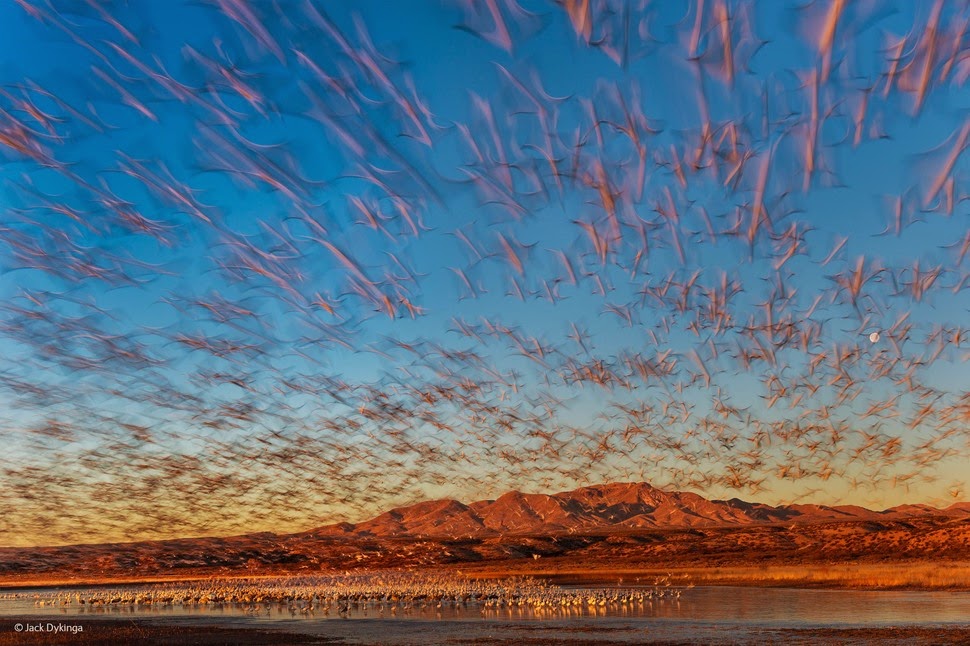
'Dawn Lift-Off' by Jack Dykinga


'Diamonds' by Malgorzata Ksiazkiewicz


'Feel Safe' by Juan Carlos Mimó Perez


'Great Peacock Moth Caterpillar' by Leela Channer


'Heavy Rain' by Pierluigi Rizzato


'Helical' by Frederic Brioris


Hide Away' by Brittany Fried


'Big Mouth' by Adriana Basques


'Innocents Betrayed' by Hilary O'Leary


'King Penguins and Fur Seals' by Denise Ippolito


'Kings into the Dark' by Stanley Leroux


'Ladybird Spider' by Carsten Braun


'Las Fauces de la Noche' by Juan Jesus Gonzalez Ahumada


'Leaping Gentoo Penguin' by Paul Souders


'Moonlight Climber' by Alexander Badyaev


'Move!' by Gerry Pearce


'Old Cloths' by Claudio Contreras Koob


'Piraputangus' by Adriana Basques


'Beechnuts Rhythm' by Sandra Bartocha


'Pure Magic' by Raviprakash S S


'Red Deer and Cranes' by Marek Kosinski


'Red Kangaroos at Waterhole' by Theo Allofs


'Sea Lions Dreams' by Christian Vizl


'Sentry Duty' by Neil Aldridge


'Shoaling Reef Squid' by Tobias Bernhard


'Startled by Stargazer' by Jennifer Jo Stock


'Shoulder Check' by Henrik Nilsson


'Too Big But So Tasty' by Alain Ghignone


'View of Tokyo' by Olivier Puccia


'Whats This' by Peter Mather


'Winter Hares' by David Tipling


'Yellow-Necked Mouse' by Carsten Braun


Yes you liked it :)

Next PostNewer Posts Previous PostOlder Posts Home